
Every RevOps team eventually hits the same wall. Marketing wants to know which campaigns drove closed-won deals last quarter. Finance wants that number segmented by deal size and time-to-close. Sales leadership wants it broken out by rep so they can adjust routing for the next campaign cycle.
You open HubSpot Reports. You build a custom report. You hit a wall.
The problem is not a missing dashboard template or an unlocked feature tier. It is architecture.
Revenue Attribution Is a Multi-Table Problem
Let's be specific about what answering that question actually requires. At minimum:
- Pull every marketing email sent in the period (from email engagement records).
- Filter to contacts who opened or clicked.
- Find which of those contacts have an associated deal that reached Closed Won.
- Measure the time from first email interaction to deal close.
- Group by email campaign and aggregate deal value and velocity.
Each of those five steps touches a different HubSpot object: Email Events, Contacts, Associations, Deals, and Deal Properties. Joining them meaningfully - and then aggregating the results - requires a relational query. In SQL terms: at least two or three JOINs, a CTE to isolate first-touch events, and a GROUP BY with aggregate functions on derived values.
HubSpot can't do any of that natively. Not because it's missing a feature. Because of how its data model is built.
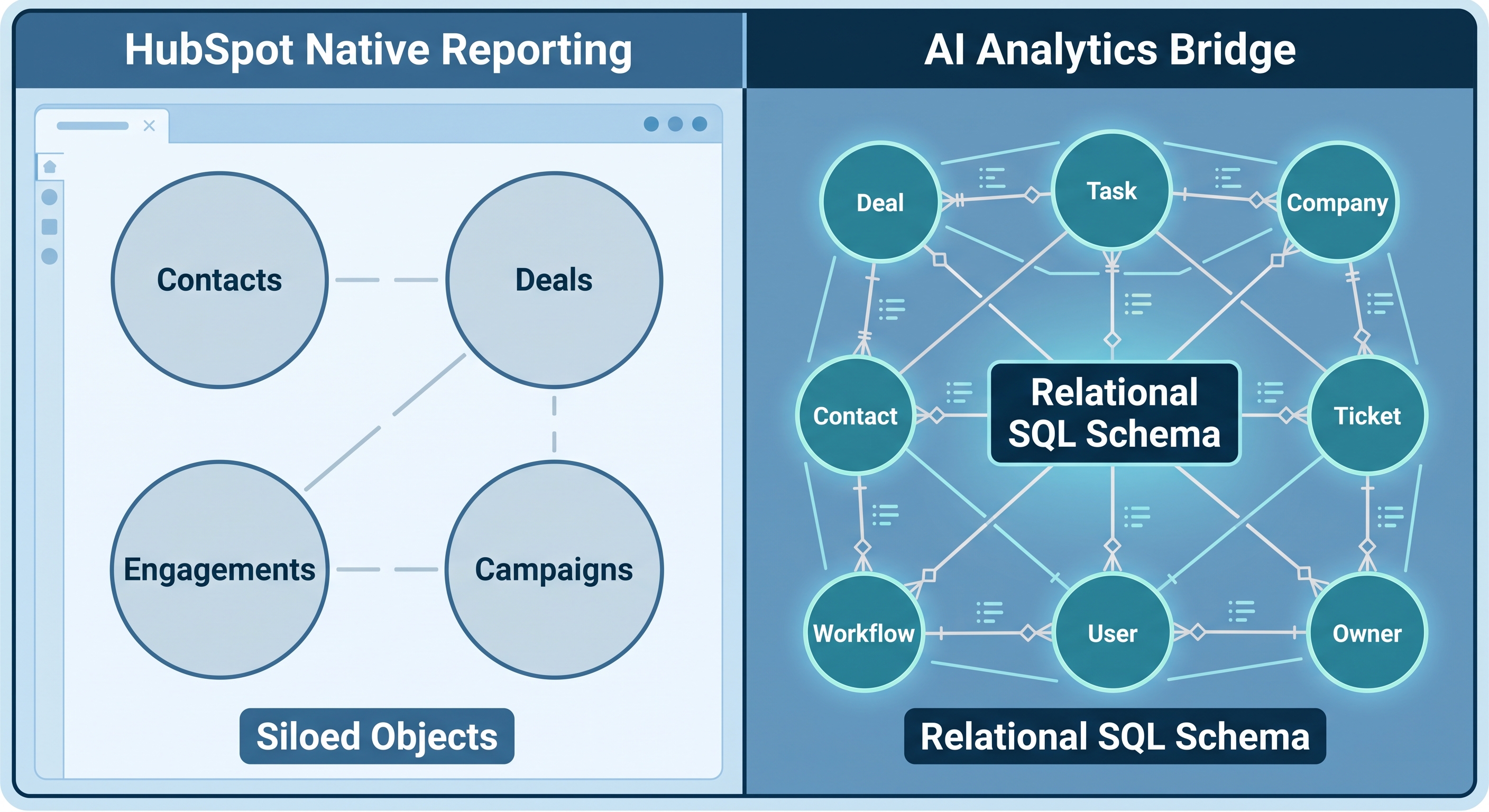
What "Single-Object Reporting" Actually Means
HubSpot's report builder is organized around its object model: Deals, Contacts, Companies, Emails, Activities. Each object is its own data silo with its own properties. Associations between objects exist - a Deal is associated with a Contact, who is associated with a Company - but those associations are stored separately from the objects themselves. HubSpot's reporting engine cannot traverse multiple association hops while simultaneously aggregating data across them.
The Custom Report Builder available at Enterprise tier extends this somewhat. You can cross two associated objects and filter on properties from both. But it still does not support:
- Window functions (
RANK(),LAG(),NTILE(),LEAD()) - Common Table Expressions (CTEs) for multi-step logic
- Aggregate-of-aggregates (averaging each rep's win rate and weighting by deal volume, for example)
- Filtering on derived values: you cannot say "show me only results where a computed metric exceeds a threshold"
These are not edge-case SQL features. They are the minimum toolkit for any serious revenue attribution model.
Three Attribution Questions Your Team Is Actually Asking
Here are three questions that surface in nearly every RevOps and Finance planning cycle - and exactly why HubSpot's reporting architecture cannot answer them.
1. Which email campaigns actually generated pipeline?
This requires joining email engagement events to contacts, then to their associated deals, then filtering for deals that reached Closed Won within a defined window (say, 90 days of first engagement). HubSpot has no way to express "contact who engaged with this campaign and then became a closed-won deal within 90 days" as a report filter. That construction requires a JOIN across three objects with a date-range condition applied on a derived value: a structural impossibility in the current reporting engine.
2. How long does it take from first touch to closed-won, and does it differ by channel?
This is a velocity question layered over an attribution question. You need the date of first marketing touchpoint per contact (the minimum email open date), the deal close date for their associated deal, the difference between those two dates, and the lead source to segment by. That requires a window function (MIN() OVER a partition), a JOIN, and a derived column. HubSpot cannot produce any of those three constructs.
3. Which reps are closing the deals that campaigns actually sourced?
Sales leadership asks this so they can route campaign-sourced leads to the reps most likely to convert them. Answering it requires joining contact engagement history to deals to deal owners, then aggregating rep-level close rates separately for campaign-sourced and non-sourced deals. That is three object types, one association traversal, and a conditional aggregation in the rollup. Native HubSpot reporting cannot express any part of that calculation.
What the SQL Actually Looks Like
For illustration, here is the query structure needed to answer Question 1: which email campaigns drove closed-won deals within 90 days of first engagement:
WITH first_touch AS (
    SELECT
        ee.contact_id,
        ee.campaign_name,
        MIN(ee.occurred_at) AS first_engagement_date
    FROM email_events ee
    WHERE ee.event_type IN ('OPEN', 'CLICK')
    GROUP BY ee.contact_id, ee.campaign_name
),
matched_deals AS (
    SELECT
        ft.campaign_name,
        d.deal_id,
        d.amount,
        d.close_date,
        DATEDIFF(day, ft.first_engagement_date, d.close_date) AS days_to_close
    FROM first_touch ft
    JOIN contact_deal_associations cda
        ON ft.contact_id = cda.contact_id
    JOIN deals d
        ON cda.deal_id = d.deal_id
    WHERE d.deal_stage = 'closedwon'
      AND d.close_date BETWEEN ft.first_engagement_date
                           AND DATEADD(day, 90, ft.first_engagement_date)
)
SELECT
    campaign_name,
    COUNT(DISTINCT deal_id)   AS deals_sourced,
    SUM(amount)               AS total_revenue,
    AVG(days_to_close)        AS avg_days_to_close
FROM matched_deals
GROUP BY campaign_name
ORDER BY total_revenue DESC;
Two CTEs, three JOINs, aggregate functions on a derived value. Any analyst comfortable with T-SQL could write this in twenty minutes. The problem is there is nowhere inside HubSpot to run it, because HubSpot does not expose its data as a relational database.
How AI Context Bridge for HubSpot Fixes the Data Layer
AI Context Bridge for HubSpot resolves this at the infrastructure layer, not as a reporting add-on layered on top of HubSpot's existing query limits.
The sync pipeline uses OAuth to pull your HubSpot data into a real Microsoft SQL Server database: normalized tables with proper foreign key relationships, not a flat JSON export or a denormalized CSV. Deals, Contacts, Companies, Email Events, and Activities each land in their own tables, linked by keys that a SQL engine can join across.

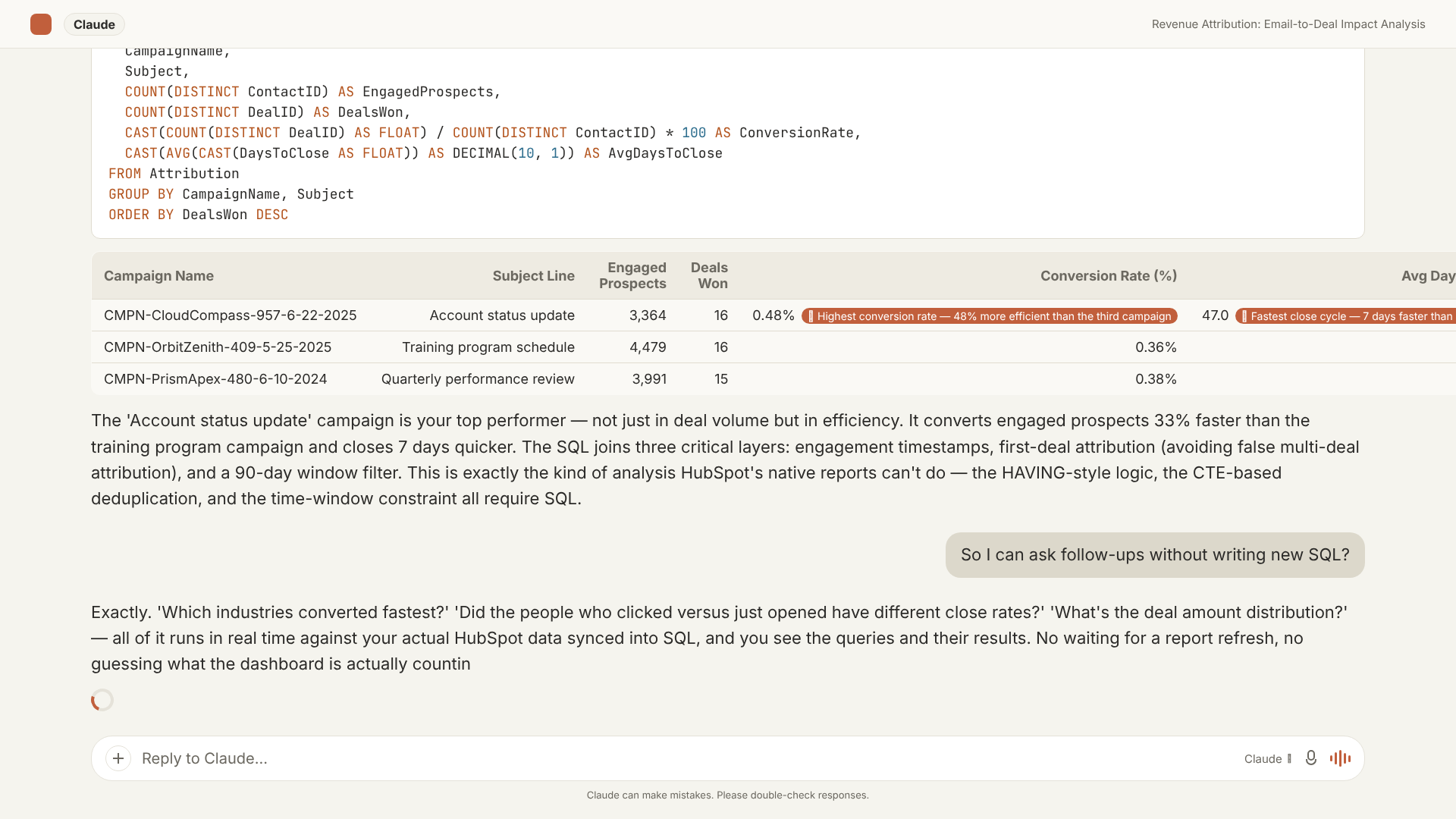
Once the data is in SQL Server, DataLabs.store exposes it through an MCP (Model Context Protocol) endpoint: the protocol that lets Claude and ChatGPT use external tools and data sources. A RevOps analyst, finance leader, or sales ops manager asks a question in plain English. The AI writes the SQL - including the JOINs, CTEs, and window functions the question requires - runs it against the live database, and returns the result alongside the full query for audit.
Every answer is reproducible. The query is visible, you can inspect it, hand it to your BI team, or schedule it as a recurring report.
What Your Team Can Actually Answer Now
With HubSpot data in SQL Server and an AI writing the queries, the three attribution questions above stop being Excel projects and become on-demand answers:
- Email campaigns ranked by closed-won revenue sourced, with average days-to-close alongside
- First-touch vs. last-touch attribution compared across the same deal cohort
- Rep performance segmented by whether the deal originated from marketing, outbound, or inbound
- Stage-by-stage velocity broken out by lead source, showing exactly where campaign-sourced deals stall
- Multi-quarter attribution trends without exporting a single file
None of this requires anyone on your team to write SQL. It requires that the data be in a place where SQL can run against it.
The Real Constraint Is the Data Layer, Not the Reporting Tool
Upgrading to HubSpot Enterprise, adding a BI connector, or buying a visualization tool that sits on top of HubSpot's existing exports does not fix the underlying problem. If your CRM data is not in a relational database with proper table relationships, multi-object queries cannot be written - regardless of what tool sits on top.
Revenue attribution at any meaningful level of accuracy requires multi-table logic. Multi-table logic requires a relational database. If your HubSpot data is not in one, every attribution model your team builds is constrained by a structural ceiling that no dashboard or data export can work around.