
If you have been reading about MCP lately, the headlines probably make it sound like a magic connector that lets ChatGPT or Claude "talk to" your tools. That is not wrong, but it obscures the part that actually determines whether you get reliable analytics or confident-sounding nonsense.
The AI model is not the differentiator. The data layer underneath it is.
This post walks through exactly what happens when you connect HubSpot to AI Context Bridge for HubSpot - the sync pipeline, the SQL Server layer, and the MCP endpoint - and why each step matters for the accuracy and auditability of the answers you get.
What MCP Actually Is (In Plain Language)
MCP stands for Model Context Protocol. Anthropic published it as an open standard in late 2024, and OpenAI and others have since adopted it. In plain language: MCP is a specification that lets AI models invoke external tools and data sources at query time, rather than working only from what was loaded into the conversation.
Without MCP, when you ask Claude "which of my deals have been sitting in Proposal Sent for more than 60 days," Claude has no data to work with. It either tells you it cannot access your CRM, or it produces something that sounds like an answer but is not grounded in anything real.
With an MCP endpoint connected to a live data source, Claude can query that data in real time and return an answer backed by actual numbers.
That last sentence is the whole point of this post.
The Three-Step Pipeline: What Happens to Your HubSpot Data
DataLabs.store moves your HubSpot data through three distinct stages before any AI is involved. Understanding each stage explains why the answers are reliable - and why most "AI + HubSpot" approaches break down the moment you ask something that requires joining more than one object.
Stage 1: OAuth Sync to SQL Server
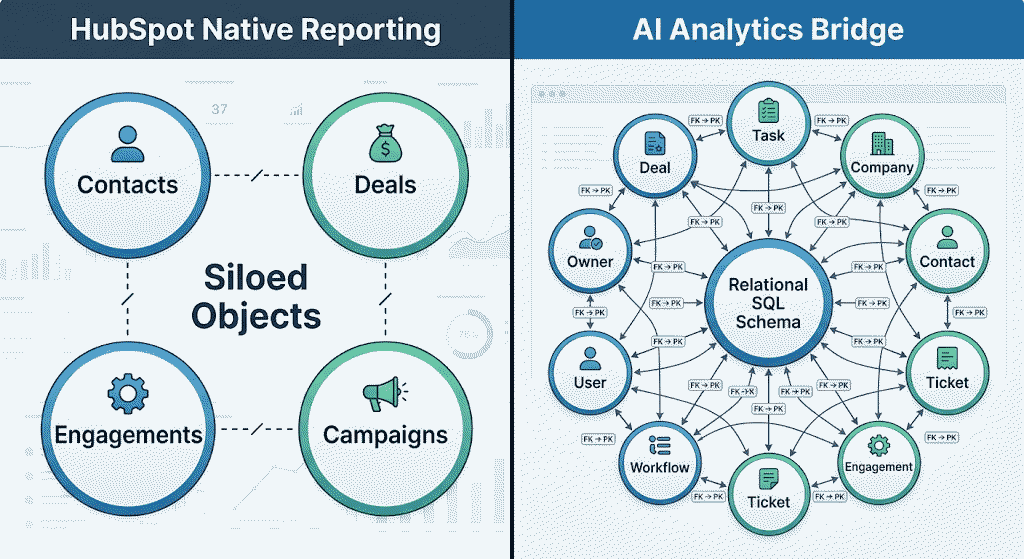
The first step is a scheduled sync that pulls your HubSpot CRM data into a real Microsoft SQL Server database. Every object type HubSpot tracks - contacts, companies, deals, tickets, engagements, email events, associations - lands in its own normalized table, with proper foreign keys linking them together.
This is not a cached JSON blob or a flat export. It is a relational schema built the way a database engineer would build it: deal stages as a column on the Deals table, company associations as a foreign-key junction table rather than a nested API property you have to dereference one call at a time.
The sync runs on a schedule: daily on the entry tier, hourly on higher tiers. Historical data stays intact. When HubSpot changes, SQL Server reflects it within the next sync window.
Stage 2: The SQL Layer - Where the Real Work Happens
This is the stage that determines whether AI analytics actually work at scale.
Once your data is in SQL Server, it is queryable with the full range of SQL: JOIN across tables, WITH clauses (CTEs) for multi-step logic, window functions (ROW_NUMBER, LAG, DATEDIFF), and aggregate-of-aggregates: for example, the average of each sales rep's individual win rate, rather than a blended average across all deals pooled together.
HubSpot's native reporting is structurally single-object. A deal report shows deal properties. A contact report shows contact properties. But a question like "for each sales rep, what is their average deal velocity weighted by their historical win rate" requires joining Deals to Owners to a pre-aggregated win rate subquery: logic HubSpot's own report builder cannot express regardless of subscription tier.
SQL Server can express it. And that is what the AI is querying.
Stage 3: The MCP Endpoint - Where AI Meets SQL
With the data in SQL Server, AI Context Bridge exposes an MCP endpoint that Claude or ChatGPT can call. When you ask a question in plain English, the model:
- Interprets your question and identifies which tables and relationships are relevant
- Writes a SQL query against your schema
- Executes it through the MCP endpoint against the live SQL Server database
- Returns the result in plain English - and shows you the SQL it wrote
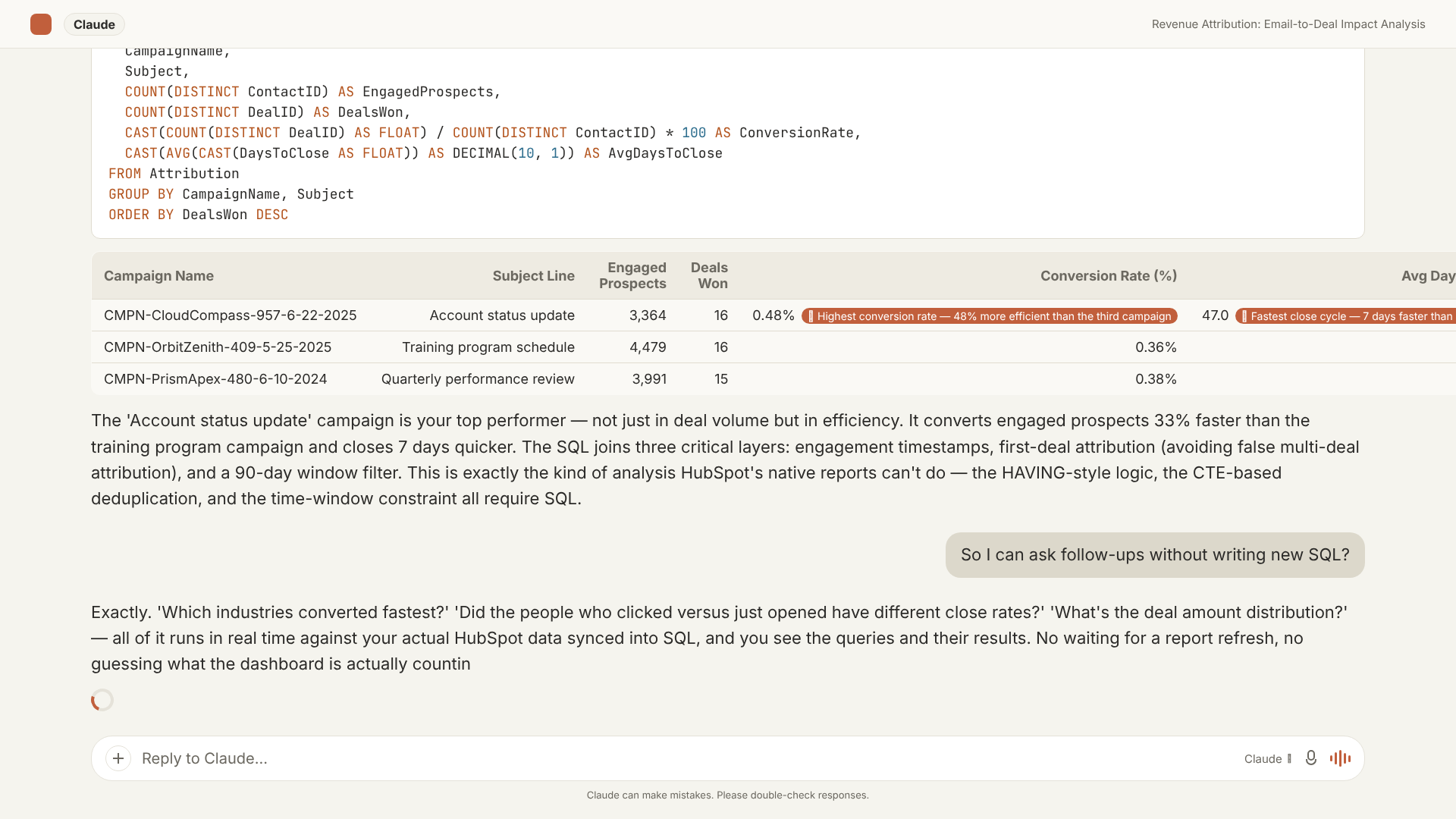
That last step - surfacing the underlying SQL - is not a cosmetic feature. It is the mechanism that makes every answer auditable. You can see exactly what the model queried, re-run it yourself, or hand it to a data analyst for validation. The answer is the output of a real query, not a summary the AI constructed from vague statistical associations.
What This Looks Like in Practice
Here is the kind of question a head of sales or RevOps lead might actually ask: "What is the average deal velocity for deals created in Q3 compared to Q4, broken down by company industry?"
HubSpot cannot answer this natively. Deal velocity requires computing a date difference between deal create date and close date - a derived value, not a stored property - and breaking it out by industry requires joining the Deals table to the Companies table, then grouping by quarter.
With AI Context Bridge, you type the question in Claude or ChatGPT. The model writes the SQL, executes it, and returns a breakdown by industry and quarter. The query it produces looks like this:
SELECT
    c.industry,
    DATEPART(QUARTER, d.createdate) AS quarter,
    AVG(DATEDIFF(DAY, d.createdate, d.closedate)) AS avg_deal_velocity_days
FROM deals d
JOIN deal_company_associations dca ON d.dealid = dca.dealid
JOIN companies c ON dca.companyid = c.companyid
WHERE d.closedate IS NOT NULL
  AND DATEPART(YEAR, d.createdate) = 2024
  AND DATEPART(QUARTER, d.createdate) IN (3, 4)
GROUP BY c.industry, DATEPART(QUARTER, d.createdate)
ORDER BY c.industry, quarter;
This query runs against your actual data and returns real numbers. A revenue operations analyst can take it, run it in SQL Server Management Studio, and get the same result. If the numbers look wrong, the SQL is right there to audit.
Why AI Analytics Without a SQL Layer Is a Different Category
There are other architectural approaches for connecting AI to HubSpot: direct API calls at query time, in-context data dumps, vector search over CRM records. Each approach is real and each has a use case.
But none of them produces the same class of answer for structured revenue analytics.
A direct API approach can retrieve individual objects but cannot execute a JOIN. An in-context data dump hits context window limits the moment your deal history exceeds a few hundred rows. A vector search finds semantically similar records but cannot compute a precise aggregate across all of them.
SQL is the reason structured analytics has worked at scale for four decades. A relational schema with proper foreign keys, queryable with a language designed for aggregation, produces mathematically precise answers - without hallucinating.
The AI Context Bridge architecture - HubSpot → SQL Server → MCP endpoint → Claude or ChatGPT - is built specifically for that second category. The AI is the interface. The SQL layer is the engine.
What This Changes for RevOps and Sales Leaders
The practical implications are simpler than the technical explanation suggests.
Questions that were structurally off-limits are now answerable. Not slightly more flexible questions. Categorically different ones. Questions that require joining multiple CRM objects, computing time-series comparisons across cohorts, running per-rep attribution analyses across filtered deal sets, or calculating stage-duration distributions for deals that never made it to close.
Every answer is verifiable. The SQL is visible. A VP of Sales can take an AI-generated pipeline analysis into a board meeting knowing it can be spot-checked, not just trusted on faith.
Follow-up questions build on what was already written. "Now filter that to deals over $50,000" appends a WHERE clause to the existing query rather than starting a new lookup from scratch. Iteration is fast.
The data reflects your live CRM state. Because the sync runs on a schedule, SQL Server reflects your current HubSpot data within the sync window - not a snapshot from the last time someone manually exported a CSV.
The Architecture Choice Behind AI Context Bridge
DataLabs.store built AI Context Bridge on SQL Server rather than a lighter-weight datastore for a deliberate reason: SQL Server is what revenue teams already trust for authoritative data. It supports the full T-SQL feature set: window functions, CTEs, recursive queries, CROSS APPLY: which covers every analytical pattern that comes up in sales, RevOps, and finance work.
The schema it creates mirrors your HubSpot structure: CRM objects as normalized tables, associations as junction tables with foreign keys, engagement events as timestamped rows. It is a schema a data engineer would recognize and could query directly with standard tooling: which means the AI's output can always be cross-checked by a human using SQL Server Management Studio or any other standard SQL client.
The MCP endpoint sits in front of that schema. Claude and ChatGPT call it. But the data layer does the heavy lifting.
If you are evaluating HubSpot MCP integrations for your revenue team, the most useful question to ask is not "which AI model does it use?" It is "what does the data layer look like, and can I verify the answers it produces?"