
The Quarterly Business Review (QBR) is two days away. Your RevOps analyst has spent the past month using AI-generated analytics to answer every major pipeline question: weighted forecasts by rep, stage velocity across the funnel, win-rate calibration for the current quarter. The numbers are clean and the story is compelling.
Then your CFO sends a message: “Before we present these numbers to the board, can someone show me exactly where they came from?”
This is not a hostile question. It is the most reasonable question an executive can ask about a number they are about to stake their credibility on. And for most AI analytics tools currently on the market, it is a question with no satisfying answer.
The Trust Gap at the Executive Level
Revenue leaders operate under a burden of proof that does not apply to consumer software. A VP of Sales presenting pipeline to the board is making a statement they can be held accountable for. A CFO approving a forecast is signing off on a figure that may appear in investor communications. A Customer Success (CS) leader presenting retention risk is influencing headcount decisions.
These situations require that numbers be auditable: not approximately auditable, not “we trust the AI,” but specifically auditable. You need to point to the records, the calculation, and the logic, and have an independent party confirm the answer is correct.
The spreadsheet era understood this instinctively. A pivot table is transparent by design: you can see which fields are included, which filters are applied, what the aggregation function is. An Excel model’s formulas are a form of documentation. Flawed, yes, but visible.
AI analytics tools, as typically implemented, represent a regression on this dimension. The answer appears. The reasoning does not.
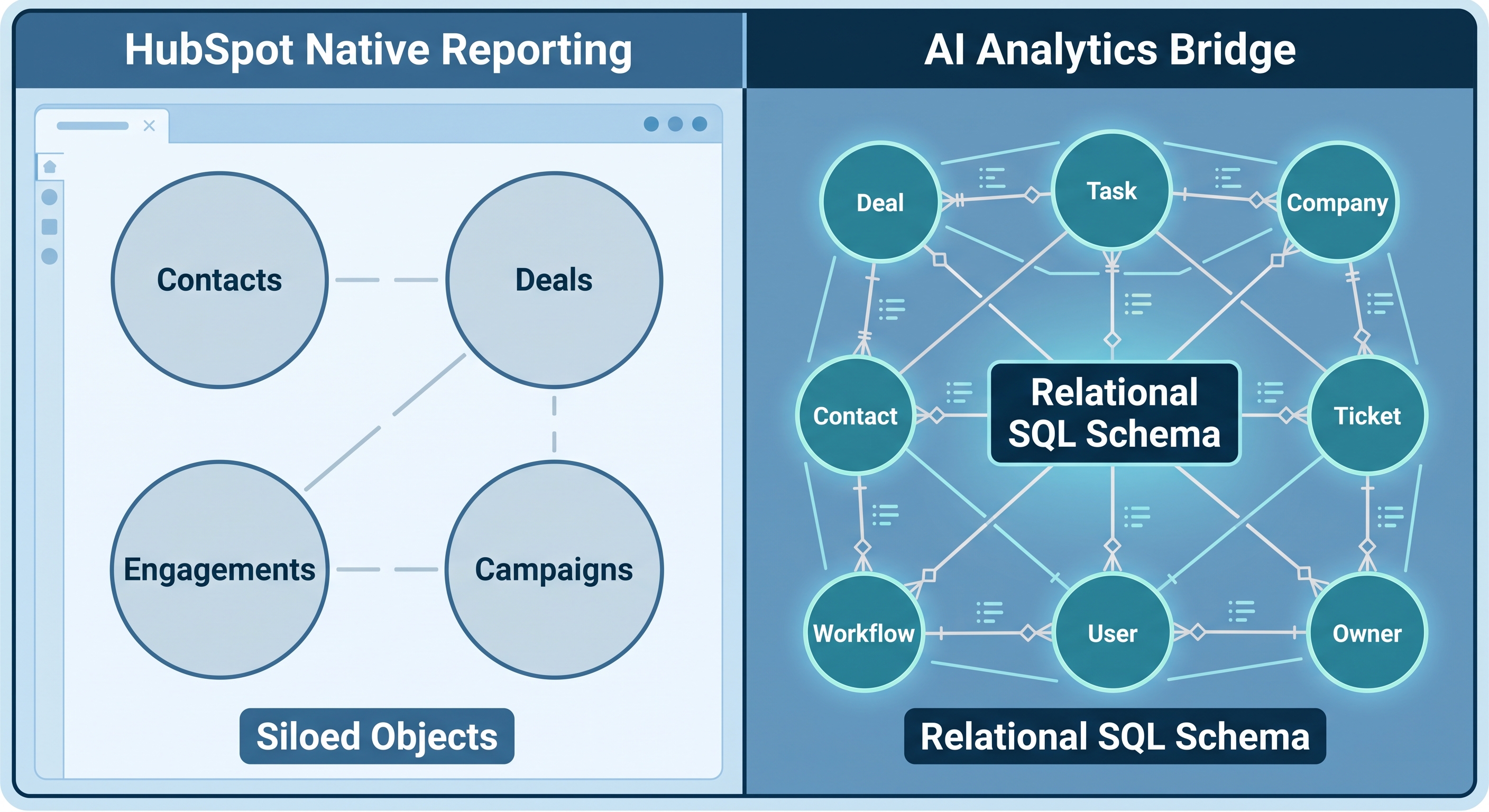
What HubSpot Breeze AI Gets Right - and Where It Falls Short
HubSpot’s Breeze AI Analyst can answer natural-language questions about your CRM data. For straightforward lookups - deal counts, stage distributions, activity summaries - it delivers genuine value.
But for executive-level reporting, it has two structural limitations that matter.
The first is scope. Breeze AI operates within HubSpot’s own reporting architecture, which is single-object at its foundation. Questions that require joining deal stage history to contact source data, or applying a rep’s historical win rate to their current open pipeline, run into structural limits before the AI layer is even reached. The queries Breeze AI can execute are bounded by what HubSpot’s own data access layer can express.
The second limitation is transparency. Breeze AI does not show you the query it ran. You receive an answer. If you need to understand whether that answer correctly handles multi-contact deals, whether it includes deals re-opened after being closed-lost, or whether the date range applied matches your actual quarter boundaries - you cannot check. There is no SQL to inspect, copy, or independently verify.
This is not a criticism of Breeze AI’s accuracy on questions it can handle. It is a description of what auditable AI actually requires and what black-box architecture cannot provide.
What an Audit Trail Actually Looks Like
DataLabs.store built AI Context Bridge for HubSpot around a specific design principle: every answer must show its work.
The technical architecture that makes this possible works in four steps:
Your HubSpot data syncs to a real Microsoft SQL Server database via OAuth. Not a flat export, not a denormalized snapshot - a normalized relational schema with distinct tables and foreign key relationships across deals, contacts, companies, and pipeline stages.
You ask a question in plain English through Claude or ChatGPT, connected via a Model Context Protocol (MCP) endpoint.
The AI writes real SQL against that schema - joins, Common Table Expressions (CTEs), window functions, aggregate-of-aggregate calculations that HubSpot’s own reporting layer cannot produce.
You receive both the answer and the SQL query that produced it, ready to copy and run independently.
That fourth step is what separates auditable AI from black-box AI. The SQL is not a simplified summary of what the AI did - it is the actual query. If the answer is wrong, the SQL shows you exactly why. If the answer is right, the SQL is your documentation. And when the numbers need to hold up under CFO scrutiny before a board meeting, a data analyst can paste that SQL into SQL Server Management Studio (SSMS) and run it against the same database to confirm the result independently.
The Forecast Calibration Example
Consider a question that surfaces before almost every QBR: “For each rep, show me their historical win rate on deals closed in the last twelve months. Then apply that rate to their current open pipeline and give me the calibrated expected value.”
HubSpot’s native reporting cannot answer this. It requires computing a per-rep win rate in one aggregation pass over closed deals, then joining that rate to a second pass over open pipeline, and multiplying deal value by win rate to produce a calibrated number. That is a multi-object join with an aggregate applied in a subquery or CTE - precisely the class of query HubSpot’s reporting layer cannot express.
AI Context Bridge handles it. And when it does, the SQL surfaces alongside the result.
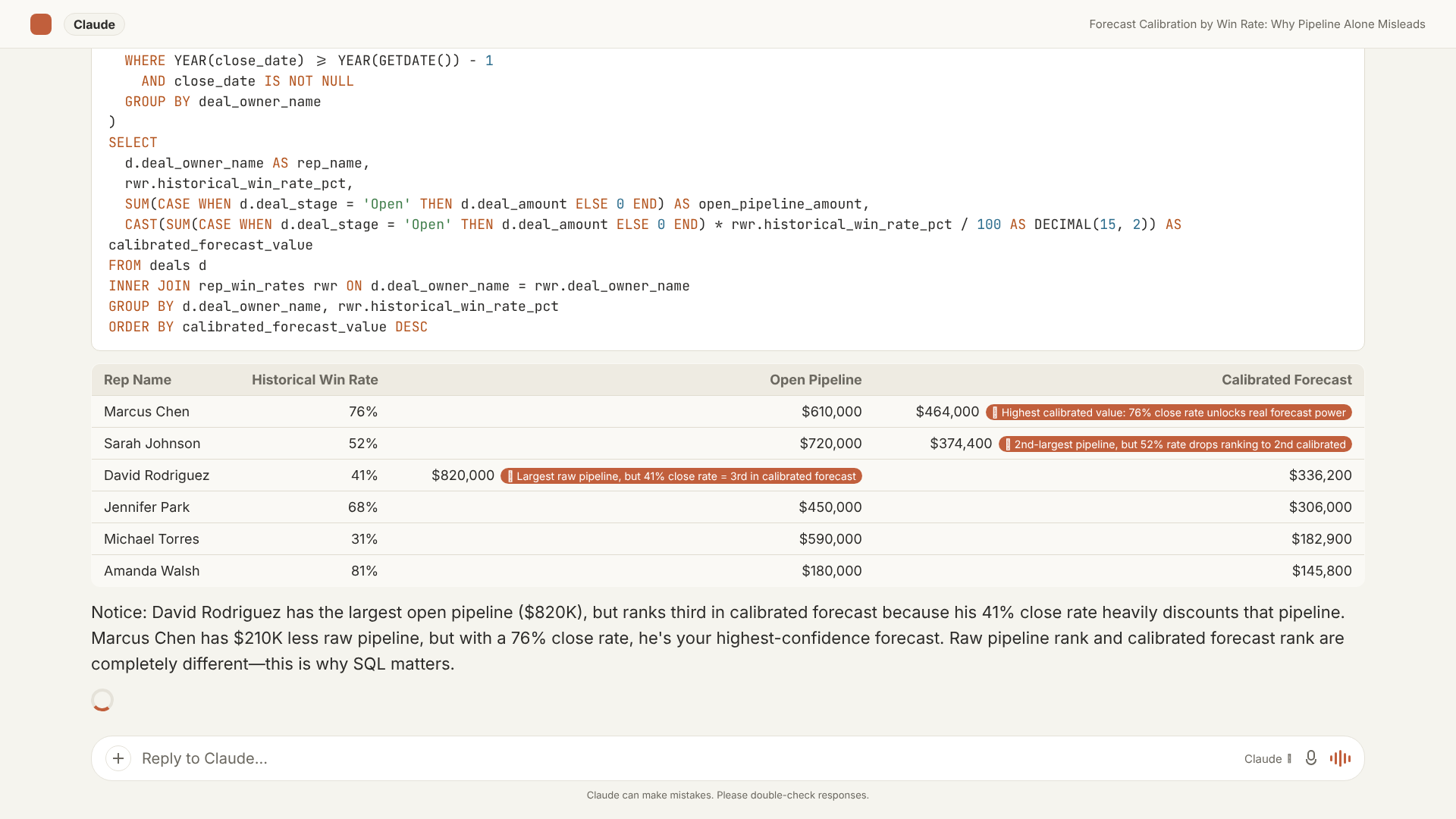
A CFO reviewing this output can read the SQL and confirm that win rates came from the trailing twelve months of closed deals, not the current quarter and not all time. A VP of Sales can see that two reps with similar raw pipeline amounts - one at $610K with a 76% historical close rate and another at $590K with a 31% close rate - produce very different calibrated forecasts: $464K versus $183K. The formula is visible. The number is defensible.
Complex Queries Are Self-Documenting
The audit trail becomes more valuable, not less, as the questions get harder.
Stage velocity analysis - how long deals spend in each pipeline stage before advancing - requires a window function that looks backward through each deal’s stage history, computes the time elapsed between consecutive transitions, and then averages that across all deals that passed through each stage. The SQL involves a LAG() function partitioned by deal, a DATEDIFF calculation between transition timestamps, and a GROUP BY on stage name. It is not a query most analysts would write quickly from scratch.
When AI Context Bridge produces that query alongside the result, you see the stage ranking and the logic that generated it at the same time.
A RevOps analyst reviewing this output can confirm the window function is correctly partitioned by deal, that the timestamps being compared are the right ones, and that the GROUP BY matches the stages they expect. The complexity of the query is not a trust problem - it is the opposite. Explicit, detailed SQL is harder to get wrong in a way that would go undetected, because every assumption is visible in the code.
The Verification Loop That Finance Teams Require
RevOps and finance teams are cautious adopters of analytics tooling, and for good reason. The history of CRM reporting is full of “that number doesn’t match the other dashboard” moments that took weeks to untangle. Definition drift - where the same metric means different things in different reports - is endemic in HubSpot shops that have grown quickly.
“Show me the SQL” is not a gatekeeping move. It is a standard due-diligence request from people who have been burned by opaque reporting before.
The verification loop for teams that have standardized on auditable AI looks like this:
| Step | Action | Who Does It |
|---|---|---|
| 1 | Ask the question in plain English | Sales leader, RevOps analyst, or finance team member |
| 2 | Review the answer and read the SQL displayed alongside it | Same person, or passes to a data analyst for review |
| 3 | For high-stakes questions: copy the SQL, paste into SSMS, run against the same database | Data analyst or RevOps engineer |
| 4 | Confirm the result matches; save the SQL as backup documentation | Same analyst |
| 5 | Present the number to the board, investor, or leadership team | Revenue leader |
This mirrors how financial reports are audited. The AI-generated number is not the authoritative source - the SQL query run against the database is. The AI’s role is to write that query correctly. The audit trail’s role is to make it independently verifiable.
What This Means for Teams Evaluating HubSpot AI
If your team is currently evaluating whether to adopt AI-generated analytics for pipeline reviews, board reporting, or revenue planning, the right question to ask of any tool is not “can it answer complex questions?” It is: “Can I verify the answer independently?”
If the answer is no - if the tool cannot produce the query it ran, or if the query references a proprietary layer you cannot inspect - then you are not adopting auditable AI. You are adopting AI on faith, which is a different risk profile than most finance and RevOps teams are prepared to accept for numbers that will appear in a board deck or investor update.
AI Context Bridge was designed to pass the “show your work” test on the first ask, not after a support ticket or a product roadmap conversation. The audit trail is present on every answer by default, because every answer needs to be defensible.
The SQL behind the answer is not a feature. It is the foundation.